






Mirroring an Android phone to a computer sounds simple until you try the common routes. Many apps demand an account, push ads into the stream, cap the resolution, or insist on rooting the phone before they will work at all. Gamers, teachers, developers, and support staff all run into the same wall when they just want the phone screen on a bigger display.
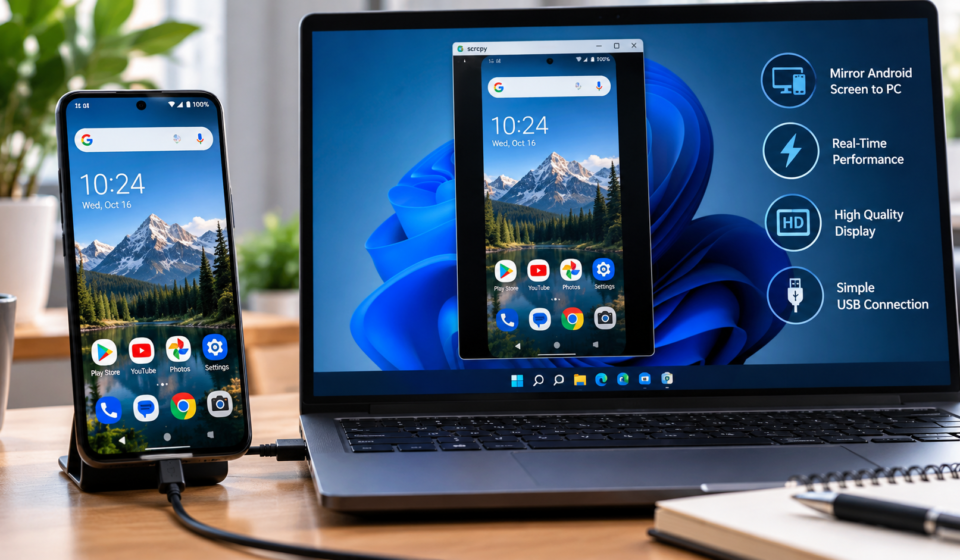
That is exactly the gap a proper scrcpy download fills. Scrcpy is a free, open source tool that shows your Android screen on a Windows, macOS, or Linux computer and lets you control it with your keyboard and mouse. No root, no account, and no watermark. This guide covers where to get it safely, what you need first, and how the first run works.
What Scrcpy Is and Why People Choose It
Scrcpy, short for screen copy, was built by the Genymobile team and released as open source software. It sends the phone display to the computer over a USB cable or a WiFi connection, compressed smartly so the picture stays sharp while the delay stays tiny. In practice the lag is low enough for gaming, live demos, and fast typing.
The control side is what wins most people over. Your mouse clicks act as touches, your keyboard types into any app, and you can copy and paste text between the phone and the computer. Files can be dragged onto the window to install apps or transfer them to the device.
- No root access required on the phone
- Works over USB for the lowest delay or WiFi for freedom
- Full keyboard and mouse control of the Android device
- Free and open source, with no ads or paid tiers
Because the tool runs from your computer and talks to the phone through the standard Android debug bridge, it leaves nothing installed on the phone itself beyond a temporary server that vanishes when you unplug.
What You Need Before You Download
The requirements are modest. The phone must run Android 5.0 or newer, which covers nearly every device still in use. You also need a USB cable for the first connection, since the wireless mode is switched on through the cable at least once.
On the phone, one setting matters: USB debugging inside the Developer options. Turning it on takes a minute. Open Settings, tap the build number seven times to unlock Developer options, then enable USB debugging inside that new menu. The scrcpy download page walks through these steps with pictures for each stage.
On the computer side there is nothing heavy to install. Scrcpy is a small package that runs as it is, and on Windows it ships with the debug bridge tool bundled in, so most users can simply extract the folder and run it.
Getting Scrcpy Safely
Because scrcpy is popular and free, copycat sites wrap it in installers stuffed with junk. The safe habit is to download only from the official project page or a trusted guide that links straight to it, and to skip any download manager or extra toolbar offered along the way.
The package itself is small, usually a few megabytes. If a download is hundreds of megabytes or asks you to install unrelated software first, close it and start again from a clean source. Checking that the folder contains the scrcpy executable and the adb files is a quick sanity test.
Windows users sometimes meet a SmartScreen prompt because the tool is not signed by a big publisher. That warning is about the signature, not about danger, and the official release is widely used by developers and IT teams every day.
The First Run, Step by Step
Connect the phone with the USB cable and allow the debugging prompt that appears on its screen. That prompt is Android asking whether this computer may talk to the phone, and ticking the box to always allow saves time later.
Then open the scrcpy folder on your computer and run the program. A window opens showing your phone screen, live. Anything you do with the mouse or keyboard happens on the phone, and anything on the phone appears in the window instantly.
If the window does not appear, the usual causes are simple: the cable carries charge only, the debugging prompt was dismissed, or another program is holding the connection. A different cable and a fresh plug in fixes most first run problems within a minute.
Going Wireless and Useful Extras
Once USB works, wireless takes one extra command to enable, after which the cable can go back in the drawer. Wireless suits presentations and living room setups, while USB still wins for gaming because it keeps delay and stutter at the lowest level.
Scrcpy also records the screen to a file, mirrors with the phone display turned off to save battery, and can show several devices at once for testing. Each extra is one command line option away, and the download page lists the common ones in plain language.
For most people the plain setup is enough: plug in, run, and work. The tool rewards a few minutes of setup with a mirror that feels like the phone is simply part of the computer, which is exactly what a good utility should do.
About the author: Post Wave Mint writes plain language software and technology guides for everyday users. Each guide focuses on safe downloads, clear setup steps, and tools that respect the reader.