





The identification card hanging from an employee’s lanyard might appear simple, but producing it involves several important decisions. A photograph must be clear, personal details must be accurate, and the finished card needs to withstand regular handling.
Some organisations also require cards that work with electronic access systems, making printer compatibility even more important.
A suitable id card printer can help businesses create professional identification cards in-house, but not every model offers the same features.
Before investing, consider how the equipment will support your organisation’s identification requirements, both now and as those requirements change.
What Print Quality Does Your Organisation Need?
Print quality influences how clearly photographs, text and other details appear on a card.
For employee identification, a recognisable photograph and readable name are usually more important than elaborate graphics.
Understanding Printer Resolution
Card printer resolution is commonly measured in dots per inch, or DPI.
Higher resolution can support finer image details, although overall quality also depends on the printing technology, ribbon and card material.
Evaluate Real Printed Samples
Rather than choosing a machine solely because it advertises a high DPI, examine sample cards where possible.
Check whether photographs appear clear and whether smaller text remains readable.
Why Card Design Also Matters
Even a technically capable printer can produce an ineffective identification card if the design is crowded.
Use readable fonts, sufficient contrast and a clear arrangement of information.
A simple layout can make staff identification easier and reduce the risk of important details being overlooked.
Should You Choose Colour or Monochrome Printing?
Different identification applications require different printing styles.
Full-Colour Identification
Colour printing is commonly used for staff photographs, company logos and branded identification cards.
It can help organisations maintain a consistent visual identity.
Monochrome Printing
Monochrome printing may be sufficient for basic text, numbers or personalisation on pre-printed cards.
A printer for id card printing that supports the intended ribbon type can help businesses manage different printing requirements.
However, check the machine’s compatibility before purchasing specialised ribbons.
Consider the Need for Card Encoding
Some identification cards serve only as visual credentials.
Others are used with electronic doors, attendance systems or membership databases.
Understanding Electronic Card Features
Depending on the application, cards may contain magnetic stripes, contact chips or contactless technology.
Printing an employee’s name on such a card is different from writing data to its electronic component.
Does Every ID Printer Support Encoding?
No. Electronic encoding is model-dependent and may require optional modules.
Organisations should confirm compatibility with their existing access control system, card type and encoding requirements.
An incompatible card may look correct but fail to work with the reader.
Before selecting an identity card printer, discuss technical integration with the appropriate access control provider.
How Important Are Printing Speed and Card Capacity?
Printing speed becomes particularly relevant during recruitment, enrolment or large events.
A small organisation issuing occasional replacements may not need high-throughput equipment.
Plan for Busy Periods
A school producing hundreds of student cards at the beginning of a term may need different equipment from an office issuing a few new staff badges each month.
Check:
- Rated printing speed.
- Input and output card capacity.
- Time required for full-colour printing.
- Single-sided or double-sided capability.
- Frequency of ribbon replacement.
- Ease of handling repeated print jobs.
An id card printer should support your busiest realistic printing periods without creating unnecessary delays.
Check Software Compatibility and Data Handling
Card design software determines how easily users can create layouts and update personal details.
Some solutions offer templates, photo placement and database-related features.
Protect Personal Information
Employee and student identification cards often contain personal information.
Organisations should consider how photographs and cardholder records are stored, accessed and deleted.
Limit software access to authorised personnel and follow applicable New Zealand privacy requirements.
A printer for id card printing should fit into a responsible identification process, not simply produce attractive cards.
What Makes a Card Durable?
Printed identification cards may experience repeated handling, abrasion and exposure to everyday environments.
Durability depends on several factors, including card material, printing technology and any protective overlay.
When Lamination May Be Useful
Certain printing systems offer lamination capabilities that can provide an additional protective layer.
This may be valuable for cards expected to remain in use for extended periods.
However, lamination equipment introduces additional costs and consumables.
Businesses should assess whether the intended card lifespan justifies the investment.
Examine Connectivity, Maintenance and Support
Before purchasing, confirm the printer’s connection options and compatibility with workplace computers.
USB connectivity may be sufficient for a single printing station, while network features can be useful in certain shared environments.
Routine cleaning is also important.
Questions for Your Supplier
Ask about:
- Compatible operating systems.
- Available printer drivers.
- Recommended cleaning intervals.
- Replacement ribbon availability.
- Card material compatibility.
- Warranty coverage.
- Maintenance and support options.
For an identity card printer used regularly, easily accessible consumables can make ongoing operation more manageable.
Why Choose InteractCard New Zealand?
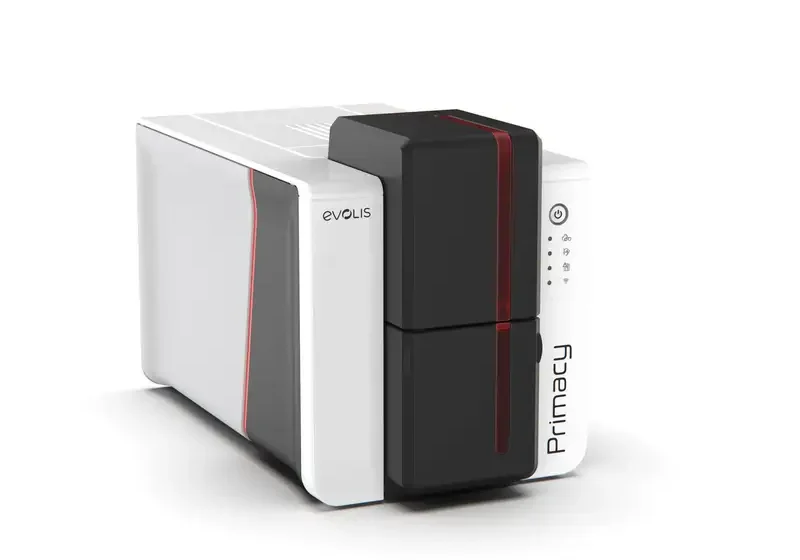
InteractCard New Zealand offers a range of Evolis identification card printers, including desktop and more specialised models.
Its product selection includes printing systems, ribbons, blank cards, software and identification accessories.
Businesses can examine the capabilities of individual machines before deciding which features match their requirements.
Customers interested in id card printer options can compare models according to output, printing methods and potential applications.
About Us – InteractCard New Zealand
InteractCard New Zealand supplies identification card-printing equipment for organisations such as businesses, educational institutions and membership-based operations.
The available range supports visual identification, plastic card personalisation and selected specialist card-printing applications.
For customers exploring an identity card printer, the company provides access to different equipment configurations and related printing supplies.
Select Features That Serve a Clear Purpose
The best printer is not necessarily the one offering the greatest number of technical features.
Clear printing, appropriate card compatibility, practical software and manageable operating costs are usually more important than specifications that will rarely be used.
Define your identification requirements before comparing models. A printer that matches your actual workflow can help your organisation produce consistent, readable cards while keeping equipment and consumable costs under control.